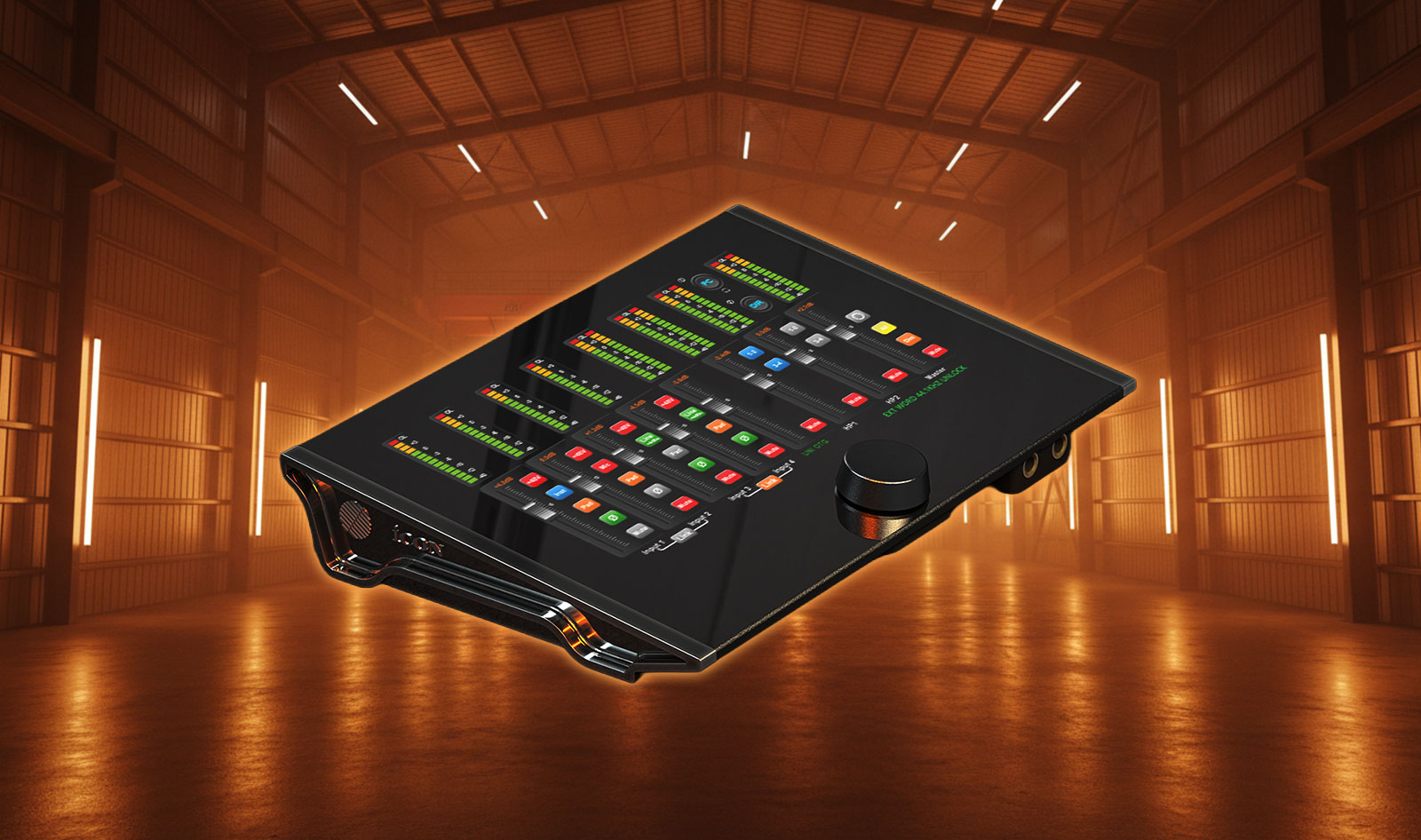
The Icon Pro Audio Touch 8 is a new USB-C audio interface designed to bring hands-on, touchscreen control directly into the heart of a modern recording or streaming setup. Built around a 10-inch capacitive multi-touch display and paired with iCON’s iO Pro control software, it aims to streamline monitoring, routing, and level management without forcing you to live in a DAW mixer window.
With four combo mic/line/instrument inputs, four line outputs, and ADAT expansion for additional digital channels, the Touch 8 targets creators who want a compact interface that still feels “console-like” in day-to-day use—whether you’re tracking vocals, running a hybrid DJ setup, or managing audio for live content.
A 10-Inch Touchscreen That’s More Than a Gimmick
The standout feature is clearly the screen: a 10-inch capacitive multi-touch LCD designed for wide viewing angles, acting as the primary front-end for metering and level control. Instead of traditional physical faders, the Touch 8 uses ultra-responsive virtual faders, complemented by touch-sensitive buttons and clear multi-segment metering, so core tasks—like setting input levels or watching peaks—remain visually and physically immediate.
From a workflow perspective, the value of a touchscreen interface is speed. When you’re recording yourself, switching between speakers, adjusting headphone mixes for a guest, or reacting to a sudden level jump during a livestream, having controls on the hardware itself can be faster than diving into software menus. The Touch 8 also adds conveniences aimed at real-world sessions, such as quick output attenuation (a dim function) and a monitor switching option for moving between different playback systems.
Inputs, Outputs, and Expansion: Designed for Flexible Setups
On the analogue side, the Touch 8 provides a 4×4 full-duplex configuration: four Neutrik XLR/TRS combo inputs for microphones, line-level sources, or instruments, plus four quarter-inch outputs for routing to monitors, outboard gear, or a second listening zone. For studios that need more channels, a single optical ADAT I/O port adds eight channels of expansion, pushing the overall capability into a 12-in / 12-out workflow at the system level.
That combination is practical for many DJ and production scenarios. You can keep your core inputs reserved for mics and instruments while using ADAT to integrate an external preamp, a multi-channel converter, or a digital stagebox—without changing the interface at the center of the rig.
iO Pro Software and On-Device Control Working Together
Rather than treating software as an afterthought, Icon Pro Audio positions iCON iO Pro as a key part of the Touch 8 ecosystem. The idea is straightforward: you can make adjustments on the touchscreen or from within the software, with access to monitoring controls such as headphone levels, master output management, and direct monitoring.
For creators who stream, iO Pro also supports host-based processing, allowing you to integrate plug-in effects—like compression, reverb, or delay—into a broadcast or performance chain. In practice, that can help you keep a consistent “finished” sound when going live, while still maintaining control over routing and monitoring from one central interface.
Audio Performance and Session Control
Specs-wise, the Touch 8 is clearly designed to compete in the premium prosumer tier. Icon Pro Audio highlights a 130 dB dynamic range on D/A conversion and 128 dB on A/D conversion, alongside mic preamps offering up to 75 dB of gain. Those numbers signal an interface intended for low-noise vocal work, detailed acoustic recording, and high-headroom line-level sources.
Session control extends beyond the main I/O. Two headphone outputs are provided with independent volume control and monitoring options—useful for collaborator-friendly tracking sessions and for live use where one headphone mix may be dedicated to cueing. Direct monitoring is included for real-time feedback while recording, and a loopback function (via iCON iO Pro on macOS and Windows) supports quick capture of system audio for tutorials, streaming, or sample sourcing.
Bundled Creative Tools for Producers and Content Creators
Alongside the hardware, the Touch 8 is positioned as a “ready-to-create” package thanks to a bundled software suite. The lineup includes iZotope VEA for voice enhancement, Harrison AVA Live for real-time channel-strip processing, and Bitwig 8-Track Studio as an entry-point DAW. Icon also lists additional creative tools such as Kilohearts Toolbox and Dotec Audio plug-ins, aiming to cover basic recording, mixing, and sound design needs out of the box.
Bundles vary in perceived value depending on your current toolkit, but for newer producers or streamers building their first serious setup, it can shorten the time between unboxing and publishing content.
Pros and Cons
Pros:
- 10-inch capacitive multi-touch screen for fast, visual control of levels and metering
- 4 combo mic/line/instrument inputs plus 4 outputs, with ADAT expansion for larger rigs
- Up to 75 dB of preamp gain and high dynamic range conversion (130 dB D/A, 128 dB A/D)
- Dual headphone outputs with independent volume control and monitoring options
- UNI OTG connectivity and iO Pro integration aimed at modern streaming workflows
- Loopback support via iCON iO Pro on macOS and Windows for content creation
Cons:
- Touchscreen-first operation may not suit users who prefer dedicated physical knobs and motorized faders
- ADAT expansion is limited to a single optical I/O port (8 channels) rather than multiple banks
- Availability may vary by region close to launch, with retailer listings still developing in some markets
Pricing and Availability
The Touch 8 is listed at €599 / $599 with availability expected around Q2 2026, according to distributor information.
More Info
More info on the official product page of Icon Pro Audio.
Conclusion
The Icon Pro Audio Touch 8 takes a clear stance: it’s an audio interface designed around immediate, touchscreen-driven control, with enough I/O to anchor a serious home studio and enough workflow features to appeal to DJs and streamers. Between the 4×4 analogue core, ADAT expansion, strong headline conversion specs, and iO Pro integration for monitoring and plug-in processing, it targets users who want a compact hub that still feels hands-on.
If you’re building a setup where speed and visibility matter—tracking yourself, managing guest headphone mixes, or running a hybrid performance and streaming rig—the Touch 8’s interface-forward approach could be a meaningful upgrade over more traditional, menu-driven boxes.